Table of Contents (17 sections)
In today's fast-evolving technological landscape, smart home device integration has become more than just a trend; it is a necessity for creating a comfortable, efficient, and secure living environment. By connecting various devices—such as smart lights, thermostats, and security cameras—you can control your entire home with a simple tap on your smartphone or through voice commands. This guide will walk you through the essential steps required for seamlessly integrating these devices into your home, along with tips to enhance your automated lifestyle.
Step 1: Assess Your Needs and Devices
Before diving into the integration process, it's crucial to assess what you want to achieve with your smart home setup. Consider the devices you already own and what additional devices you might need. For example, if you want to enhance security, a smart camera or doorbell might be essential. According to Statista, the global smart home market is expected to reach $174 billion by 2025, demonstrating a significant growth in consumer interest.
Checklist for Assessment:
- List current devices (lights, thermostats, etc.)
- Identify key areas for automation (security, energy savings, convenience)
- Research additional products that fit your needs
By tackling this preliminary evaluation, you set a solid foundation for a well-integrated smart home.
Step 2: Choose a Central Hub
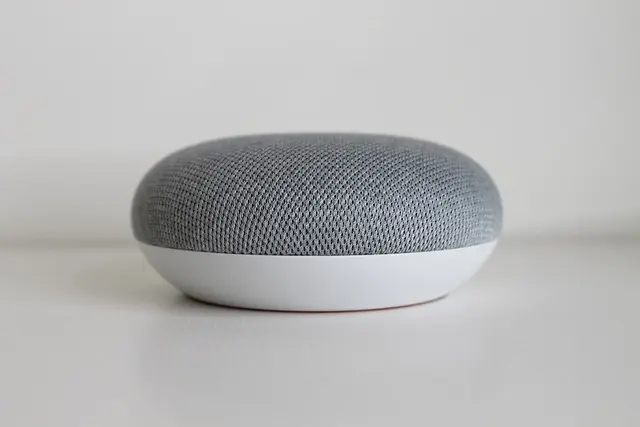
The next significant step in smart home device integration is selecting a central hub. A central hub acts as the brain of your smart home, allowing all devices to communicate with one another effectively. Common hubs include Amazon Echo, Google Nest, and Samsung SmartThings. Each platform has its strengths and compatibility with various devices, so consider your needs and the devices you plan to integrate. Studies indicate that users connected through a central hub report a much smoother user experience, particularly with automation routines and device notifications.
Tips for Choosing a Hub:
- Check device compatibility with your existing gadgets
- Assess the ease of use and setup
- Look out for additional features like voice control and automation options


Kensington Pro Fit Ergo Wired Keyboard - keyboard - US - black Input Device
lenovo.com

Step 3: Set Up Your Devices
Once you have chosen a central hub, it is time to begin the installation process for your smart home devices. Most smart devices come with user-friendly applications that guide you through the setup. Common devices you may want to include are:
- Smart Lights: Ideal for setting the mood and saving energy.
- Smart Thermostats: To optimize heating and cooling for comfort and efficiency.
- Security Cameras: To ensure the safety of your home.
Installation Process:
- Connect your device to power and ensure it is within the hub's range.
- Download the corresponding app and create an account (if necessary).
- Follow the app’s prompts to add the device to your hub.
- Test the device to ensure it responds correctly to commands.
As you install each device, note how they interact with the hub and each other, adjusting settings as needed for optimal performance.
Step 4: Create Routines and Automations
After all devices are set up and integrated into your central hub, the real fun begins—creating routines and automations. This step allows you to customize how your devices work together, enhancing your smart home's functionality. For instance, you could program your outdoor lights to turn on at sunset, or set your thermostat to adjust automatically when everyone leaves the house.
Automation Examples:
- Morning Routine: Smart blinds open, coffee maker brews, and lights gradually brighten.
- Away Mode: Security cameras activate, and lights turn off or simulate occupancy.
Utilizing these routines not only boosts convenience but also helps in energy management, reducing unnecessary electricity usage.
Step 5: Regular Maintenance and Updates
Maintaining your smart home equipment is crucial for seamless integration. Regularly check for firmware updates, troubleshoot connectivity issues, and ensure all devices remain compatible with your central hub. Research shows that proactive maintenance can extend the life of your smart devices and enhance their performance. Certain models even download updates automatically, making it even easier to stay up to date.
Maintenance Tips:
- Keep your device apps updated to the latest versions
- Conduct periodic checks on device functionality
- Read user manuals for troubleshooting any issues
Step 6: Explore Advanced Features
Once you've established a solid foundation, do not hesitate to explore advanced features that may enhance your smart home experience. Consider integrating voice control with AI assistants, remote control capabilities, and integration with third-party apps for more complex automations. Features like geofencing can further personalize your environment by adjusting settings automatically based on your location. This can increase comfort while also promoting energy efficiency.
Advanced Feature Ideas:
- Utilize smart locks for key-free entry
- Implement energy monitoring with smart plugs
- Use IFTTT (If This Then That) for more complex automation scenarios

Kensington Pro Fit Ergo Wireless Keyboard - keyboard - US - gray Input Device
lenovo.com
HOMEBAY 6-Tier L-Shaped Corner Bookshelf, Freestanding Wooden Bookcase with Anti-Drop Panel & Anti-Tip Device
bedbathandbeyond.com
Lush Living Finds Forearm Strengthening Device, Wrist Gyro Ball Power Trainer For Finger And Arm Muscle Strength blue
inspireuplift.com
Conclusion
Integrating smart home devices is an enriching process that fosters convenience and efficiency. By following these six steps, you can create a well-automated lifestyle tailored to your needs. Remember, the key to successful smart home device integration lies in choosing compatible devices and regularly updating your systems.
📺 Resource Video
To help you further, [Smart Home Integration Tutorial 2026], an in-depth look into the integration process. Search on YouTube: best practices for smart home device integration 2026.
Glossary
| Term | Definition |
|---|---|
| Smart Hub | A central device that manages all connected smart home devices. |
| Automation | A set of programmed actions performed by smart devices without manual intervention. |
| Geofencing | A feature that uses GPS or RFID to trigger actions based on a user's location. |
Checklist before Purchase
- [ ] Assess your current devices
- [ ] Choose a compatible central hub
- [ ] Ensure devices are easy to install
- [ ] Test all functionalities after setup
- [ ] Explore advanced features to maximize your system
🧠 Quick Quiz: What is the purpose of a central hub in a smart home?
- A) To control individual devices separately
- B) To manage all devices in one interface
- C) To sell products online
Answer: B — A central hub consolidates control of multiple devices for seamless integration.
📺 Pour aller plus loin : Why Your Smart Home is About to Break (2026) sur YouTube
Recommended products
Selected by our experts
Lush Living Finds Forearm Strengthening Device, Wrist Gyro Ball Power Trainer For Finger And Arm Muscle Strength black
inspireuplift.com

TheTouchPoint Solution™ TouchPoints Essentials Stress-Relief Wearable Device
sleeplay.com


PLAUD Inc. Plaud Note AI Voice Recorder, AI Note Taking Device, Transcribe & Summarize, Support 112 Languages, 64GB Navy Blue Digital Audio Recorder
plaud.ai

PLAUD Inc. Plaud Note AI Voice Recorder, AI Note Taking Device, Transcribe & Summarize, Support 112 Languages, 64GB Navy Blue Digital Audio Recorder
plaud.ai